
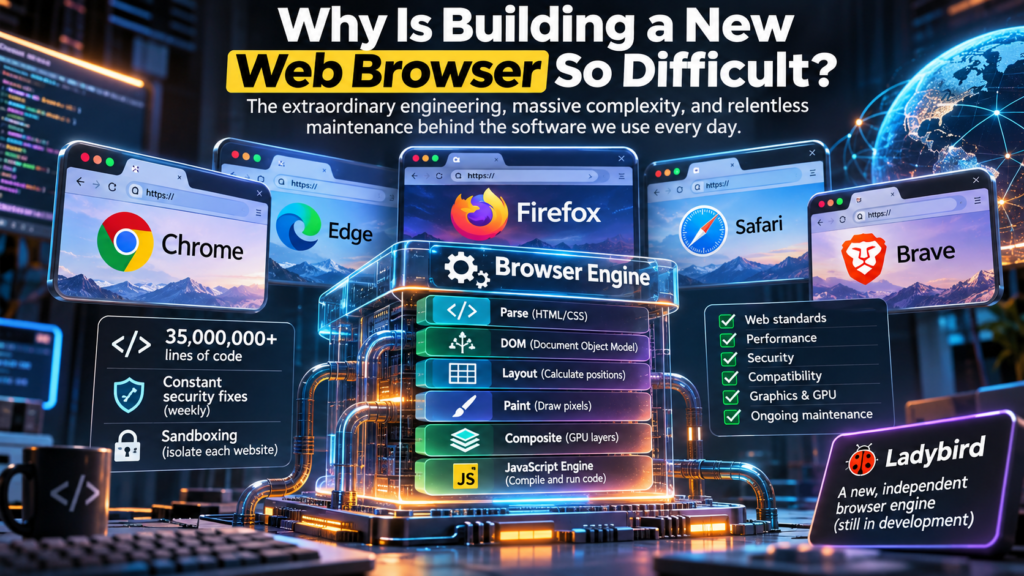
The hidden engineering, enormous costs, security challenges, and technical barriers behind the software we use every day.

Every day, billions of people open a web browser without giving much thought to what happens behind the screen.
You type a website address, press Enter, and within seconds, a webpage appears. You watch videos, read articles, make payments, access social media, download files, and run complex web applications.
It feels simple.
But behind that seemingly effortless experience is one of the most sophisticated pieces of software ever developed.
Here is something interesting: although there are millions of applications available across different platforms, only a relatively small number of companies build the browser engines that power the modern web.
Why?
Why can developers build social networks, messaging applications, operating systems, and sophisticated AI platforms, but building a completely new web browser remains an enormous engineering challenge?
The answer goes much deeper than designing a user interface or writing code that opens websites.
It is about rebuilding an entire technology ecosystem.
1. The browser market is dominated by a handful of engines
One of the biggest reasons building a new browser is difficult is that the industry has become heavily dependent on a small number of browser engines.
A browser engine is the technology responsible for interpreting web standards and turning website code into something users can see and interact with.
Think of it as the engine inside a car. The car’s exterior, dashboard, seats, and entertainment system can change, but the engine determines how the vehicle performs.
The same principle applies to browsers.
Here are some of the major players:
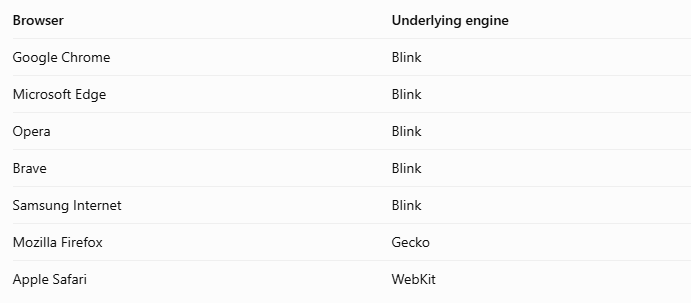
Blink is part of the open-source Chromium ecosystem. It powers Chrome and several other popular browsers.
This means that companies can develop their own browser interfaces, privacy features, synchronization systems, extensions, and user experiences without having to build an entirely new rendering engine.
For example, Microsoft moved Edge from its proprietary EdgeHTML engine to Chromium in 2020.
That decision allowed Microsoft to benefit from an established web engine rather than continuing to maintain a separate implementation of web standards.
Similarly, Brave and Opera use Chromium as their foundation while adding their own features.
This is not necessarily a bad thing. Chromium is open source, and its widespread adoption helps developers maintain compatibility across many browsers.
However, it creates an important question:
If most browsers depend on the same underlying technology, how much real competition exists at the engine level?
A browser can look completely different from another browser while sharing much of the same underlying technology.
That is why browser engine diversity matters.
2. What actually happens when you open a website?
This is where things become interesting.
When you enter a website address, your browser does much more than retrieve a document from a server.
It executes a complicated sequence of operations involving networking, parsing, layout calculations, graphics processing, JavaScript execution, and security controls.
Let’s break it down.
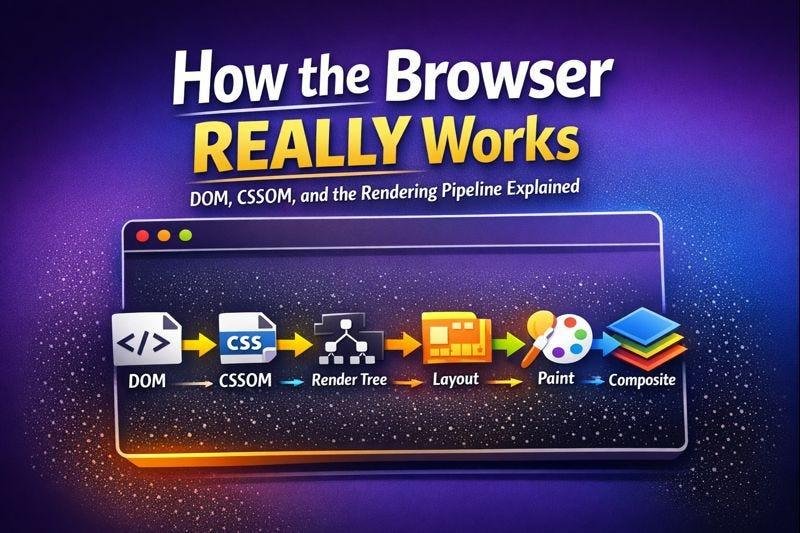
Step 1: Downloading website resources
When you visit a website, the browser communicates with a server and requests the necessary resources.
These may include:
- HTML documents.
- CSS stylesheets.
- JavaScript files.
- Images and icons.
- Fonts.
- Audio and video files.
The browser also handles DNS resolution, secure HTTPS connections, caching, and other networking operations.
Step 2: Building the DOM
The browser reads the HTML document and converts it into a structured representation called the Document Object Model (DOM).
The DOM represents the different elements of a webpage in a tree-like structure.
For example, a simple webpage might contain:
- A header.
- A navigation menu.
- A main content section.
- Images.
- Paragraphs.
- A footer.
Each element becomes part of the DOM tree, allowing the browser and JavaScript to understand and manipulate the page.
Step 3: Calculating styles and layout
Next, the browser processes CSS to determine how each element should look.
It calculates properties such as:
- Font size and colour.
- Background colours.
- Margins and padding.
- Element positioning.
- Width and height.
- Responsive layouts.
The browser then performs layout calculations to determine exactly where each element should appear on the screen.
This is also called reflow in relevant rendering contexts.
Step 4: Painting the page
Once the browser knows what the page should look like and where everything belongs, it prepares the visual representation.
This stage is known as painting.
The browser determines the colours, borders, text, shadows, images, and other visual details that need to be drawn.
Step 5: Compositing and displaying pixels
Modern browsers divide webpage content into layers.
The compositor combines these layers into the final image displayed on your screen. Graphics hardware can accelerate many of these operations.
This is one reason modern browsers can handle animations, scrolling, video, and complex interfaces smoothly.
Step 6: Executing JavaScript
Websites are no longer static documents.
They contain sophisticated applications that respond to user interactions, communicate with servers, update content, and process information.
This is where the JavaScript engine becomes important.
For example, Google Chrome uses V8, while Firefox uses SpiderMonkey.
These engines interpret and compile JavaScript so that it can execute efficiently.
The challenge is ensuring that JavaScript runs quickly without making the entire browser unstable or unresponsive.
And remember, these operations must work together.
A small mistake in one component can affect the entire browsing experience.
3. Security is another enormous engineering challenge
Imagine visiting a website that contains malicious code.
You would not want that website to access your personal files, read information from another website, or interfere with other applications running on your computer.
This is why browsers implement sophisticated security architectures.
One important technology is called sandboxing.
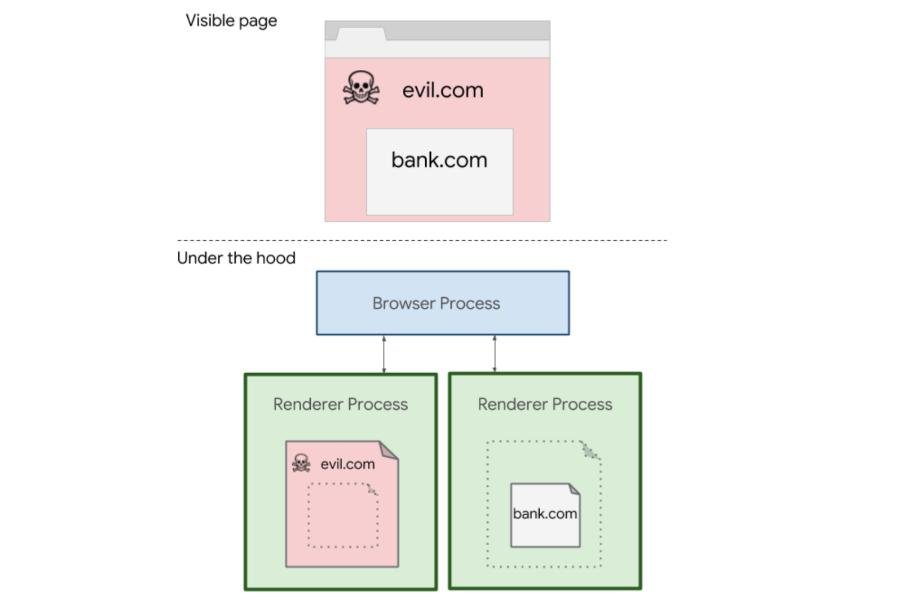
Sandboxing isolates website processes and restricts what they can access.
In Chromium, for example, different components run in separate processes. Web content is handled by renderer processes, which are restricted from freely accessing the operating system and other browser processes.
Browsers also implement security mechanisms such as:
- Same-Origin Policy.
- Site Isolation.
- Content Security Policy.
- HTTPS and TLS protection.
- Permission controls.
- Cross-Site Scripting (XSS) protections.
- Memory safety mechanisms.
- Protection against malicious downloads.
Building these features is difficult.
But maintaining them is even harder.
Security vulnerabilities are discovered regularly, and browser developers must investigate, patch, test, and distribute updates quickly.
For perspective, Chrome introduced weekly stable security updates in 2023. In September 2026, it moved to a two-week major release cycle while retaining weekly security refreshes.
Google has also discussed accelerating security releases further in response to emerging threats.
This demonstrates that browser development is not a project you complete once and forget.
It requires continuous engineering, security research, testing, and maintenance.
4. The financial cost of building a browser engine
This is where many ambitious projects encounter their biggest obstacle.
Building a browser interface is relatively straightforward compared with developing an entirely new browser engine.
A company can create a browser interface with tabs, bookmarks, downloads, history, settings, and other features using existing technologies.
However, creating an independent engine requires a much larger investment.
You need specialists in areas such as:
- Systems programming.
- Compiler engineering.
- JavaScript runtime development.
- Graphics programming.
- Networking.
- Operating system integration.
- Cybersecurity.
- Software testing.
- Web standards implementation.
You also need infrastructure for continuous integration, automated testing, performance benchmarking, and security auditing.
And the work does not end when the first version launches.
Web standards continue evolving. Websites become more sophisticated. New APIs are introduced. Security threats change.
Your engine must keep up.
There is also a commercial challenge.
How do you convince millions of people to abandon established browsers and trust a new product?
Users already have years of browsing history, saved passwords, bookmarks, extensions, synchronised accounts, and familiar workflows.
A new browser must provide compelling reasons to switch.
This creates a difficult business equation:
High development costs + continuous maintenance + difficult user acquisition = a very challenging market.
5. The interesting case of Mozilla Firefox

Firefox is one of the most important examples of browser engine independence.
Unlike Chrome and most Chromium-based browsers, Firefox uses Gecko, Mozilla’s independently developed rendering engine.
However, there is an interesting financial relationship between Mozilla and Google.
Google competes with Firefox through Chrome, yet it has also been one of Mozilla’s most important financial partners.
Why?
Because Google pays Mozilla to make Google the default search engine in Firefox in relevant markets.
According to evidence presented in the US Department of Justice’s antitrust proceedings, Google paid Mozilla approximately $484.5 million in 2024 through its revenue-sharing arrangement.
That represented approximately 85% of Mozilla’s global revenue.
The agreement was extended in March 2025 through December 2026.
Think about that for a moment.
A company competing against Google in the browser market depends heavily on payments from Google to support its operations.
This illustrates how difficult it is to sustain an independent browser business.
It is not simply about having good engineers or creating an excellent product. Revenue, distribution, partnerships, and market power also matter.
Mozilla’s situation also demonstrates why maintaining multiple independent browser engines is important for the long-term health of the open web.
6. Meet Ladybird: The ambitious attempt to build a new browser engine
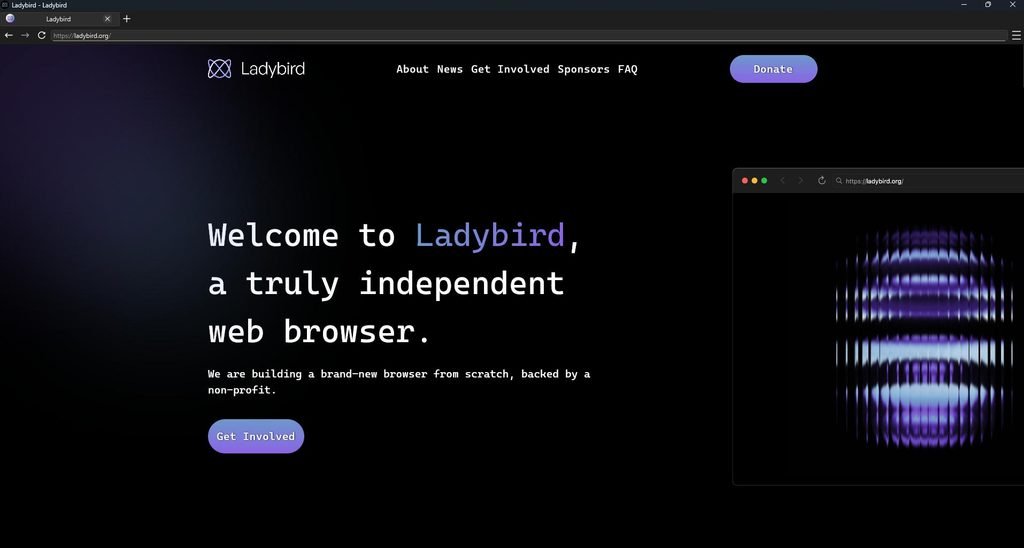
If you want to understand how difficult building a browser engine really is, take a look at the Ladybird Browser project.
Ladybird is an ambitious attempt to build an entirely new browser engine from scratch.
It is not a Chromium fork. It is not based on Gecko or WebKit.
Its objective is to create a genuinely independent browser built around open web standards.
The project is particularly interesting because it demonstrates how much engineering is required to create something that can compete with established browsers.
As of November 2026, Ladybird is still preparing for its first alpha release, planned for later this year.
But its progress is impressive.
In its October 2026 development update, the team reported several important achievements:
- JavaScript JIT compilation: The project introduced a Just-In-Time compiler to improve JavaScript execution performance.
- WebAssembly improvements: It developed a new WebAssembly engine with significant performance improvements.
- Rendering improvements: Style and layout processing were moved away from the main JavaScript execution thread.
- Security improvements: The team continued strengthening process isolation and sandboxing.
- Web compatibility: Ladybird reported passing Safari Technology Preview on the Web Platform Tests.
That last achievement is particularly interesting.
The Web Platform Tests project contains millions of individual tests that help browser developers verify whether their implementations correctly follow web standards.
Ladybird reported approximately 2.18 million passing subtests at the end of October 2026.
That is a significant milestone for an independent browser engine.
The project also revealed that AI coding agents helped implement numerous smaller fixes against the Web Platform Tests.
This is an important development because it shows how AI can accelerate browser engineering without eliminating the need for experienced developers and rigorous testing.
You can follow the project through its official website: Ladybird Browser
7. Can artificial intelligence build a new browser?
With the rapid development of AI coding assistants, tools such as ChatGPT, GitHub Copilot, Claude, and other AI-powered development platforms, it is reasonable to ask:
Why can’t we simply ask AI to build a new browser?
AI can already generate complex applications, write programming languages, identify software vulnerabilities, and assist with debugging.
Surely building a browser should be possible?
Well, there is a difference between generating code and engineering a complete, reliable software ecosystem.
AI can help developers:
- Implement HTML and CSS parsing components.
- Write JavaScript engine functionality.
- Generate automated test cases.
- Identify potential security vulnerabilities.
- Optimise algorithms.
- Debug rendering problems.
- Analyse browser compatibility issues.
But producing individual components is not the same as creating a browser that can reliably run the modern web.
The difficult part is ensuring that millions of interconnected features work together correctly.
A browser must handle websites built by millions of developers, using different frameworks, programming techniques, APIs, and web standards.
It must also remain secure against attackers who actively search for weaknesses.
AI can accelerate this work, but human engineering, architectural decisions, verification, and security testing remain essential.
Interestingly, Mozilla and Anthropic demonstrated the potential of AI-assisted browser security research in 2026. Their collaboration identified 22 vulnerabilities associated with CVEs in Firefox, alongside 90 additional bugs.
That is a powerful example of AI helping engineers improve an existing browser rather than independently replacing the entire engineering process.
8. Why browser engine diversity matters
You might be wondering why we should care whether most browsers use Chromium.
After all, if Chromium works well, why not let everyone use it?
The answer is competition and innovation.
Having multiple independent browser engines creates several benefits:
1. Healthy competition
Independent engineering teams can explore different approaches to performance, security, privacy, and resource management.
2. Better web standards
When multiple engines implement web standards independently, developers can identify compatibility problems and avoid designing websites around the behaviour of a single browser.
3. Reduced dependence
If the majority of browsers depend on one engine, a major technical problem or strategic decision affecting that engine can have consequences across much of the web.
4. Innovation
Independent engines can experiment with new architectures and approaches that might eventually influence the wider browser industry.
The goal is not necessarily to eliminate Chromium.
The goal is to ensure that the web remains an open platform where no single company or technology controls the entire browsing experience.
9. So, is building a new web browser impossible?
No.
But building a genuinely independent browser engine that can compete with established technologies is one of the most demanding software engineering projects you can undertake.
There is a major difference between:
- Building a browser interface.
- Building a browser based on Chromium.
- Building a completely independent browser engine.
The first two are achievable for relatively small development teams.
The third requires years of engineering, significant financial resources, specialised expertise, continuous security research, and an enormous testing effort.
Projects such as Ladybird demonstrate that independent browser development is still possible.
They also remind us that innovation does not always mean creating another application with a different interface.
Sometimes, real innovation means rebuilding the foundations on which millions of other applications depend.
Final thoughts: The software engineering we rarely notice
The next time you open Chrome, Firefox, Safari, or Edge, remember that you are interacting with far more than an application that displays websites.
You are using a sophisticated software ecosystem responsible for interpreting programming languages, rendering graphics, managing network communications, executing applications, protecting your data, and keeping billions of people connected.
And it does all this in seconds.
As developers, IT professionals, and technology enthusiasts, we often focus on building visible applications.
But some of the most impressive engineering happens underneath the interfaces we use every day.
A web browser is not just a window to the internet. It is one of the most complex pieces of infrastructure that makes the modern internet possible.
That is why building a new one is so difficult.
Previous: Python Automation in 2026: From Simple Scripts to Real-World Workflows – Part 1
Leave a comment